---
---
# Design your data model
## 1 - Open your model
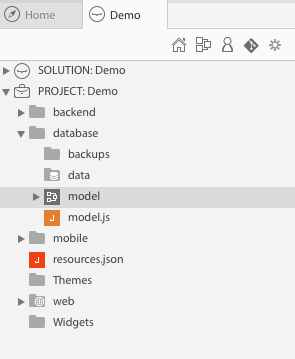 `database/model.waModel`
> **TIPS**:
> - click on
`database/model.waModel`
> **TIPS**:
> - click on  to change the view options (the `.waModel` extension is hidden by default)
> - click on
to change the view options (the `.waModel` extension is hidden by default)
> - click on  to quickly access your model
## 2 - Design your data model
to quickly access your model
## 2 - Design your data model
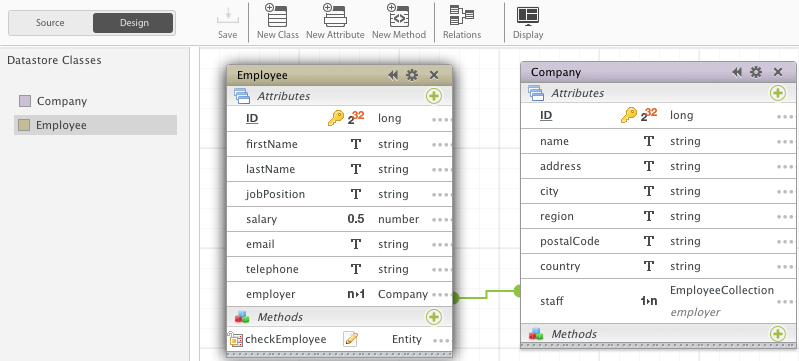 [Learn more »](http://doc.wakanda.org/home2.en.html#/Datastore-Model-Designer/Datastore-Model-Designer.100-1051416.en.html){:target="_blank"}{:class="btn"}
>
[Learn more »](http://doc.wakanda.org/home2.en.html#/Datastore-Model-Designer/Datastore-Model-Designer.100-1051416.en.html){:target="_blank"}{:class="btn"}
>  >
> If you need to reload your model in an already started server, a badge will appear in the Studio toolbar. Click on the squared reload button to reload the model. The second one performs a full solution reload.
---
Now, create a web application with Wakanda and Angular:
[Create a web app »](create-web-app.html){:class="btn"}
>
> If you need to reload your model in an already started server, a badge will appear in the Studio toolbar. Click on the squared reload button to reload the model. The second one performs a full solution reload.
---
Now, create a web application with Wakanda and Angular:
[Create a web app »](create-web-app.html){:class="btn"}